Best Nutrition Label Generator: 6 Tools Compared
Compare the best nutrition label generator options for food brands, including free FDA label tools, recipe features, exports, pricing and watermarks.
NutritionFactLabel is the best nutrition label generator for small brands that want to build an FDA compliant US Nutrition Facts label for free, with no account or credit card. The free version builds the three main US formats and downloads watermarked JPG previews; a clean, print-ready file costs $3 per label or comes with a plan, and paid plans add international formats, costing and professional file exports.
That does not make it the best tool for every business. ReciPal has mature recipe and costing workflows, Food Label Maker offers extensive ingredient analysis, and Genesis R&D targets larger food manufacturers with deeper formulation tools. This guide compares six options fairly, including where a paid alternative may make more sense for your workflow.
How to choose the best nutrition label generator
The right Nutrition Facts label generator should match both your current product and the way your business expects to grow. Compare tools using these six criteria.
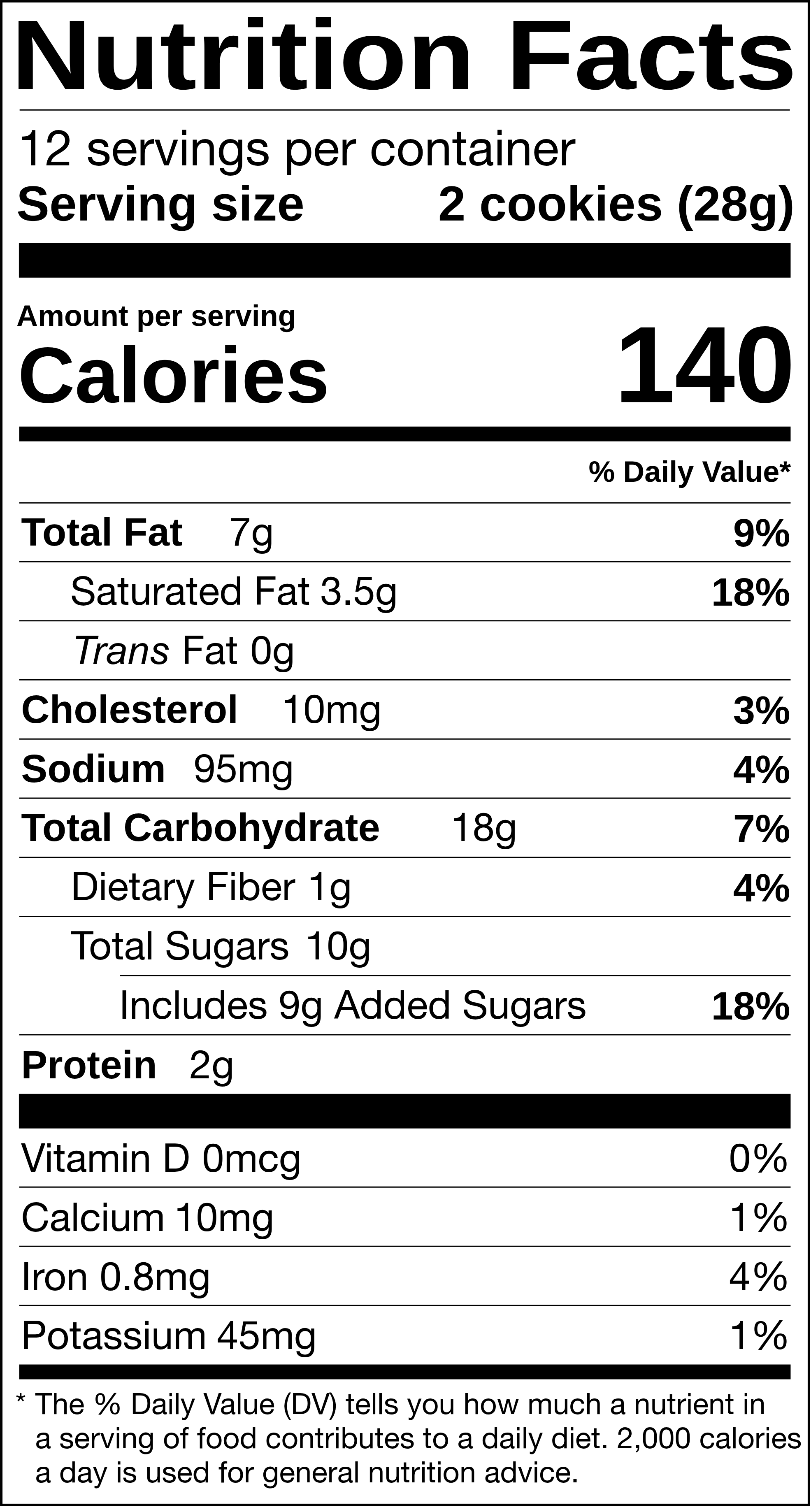
- Compliance accuracy. The tool should apply current nutrition labeling rules, required nutrients, rounding conventions, serving information and approved panel structures. A visually accurate label is not enough if the underlying calculations are wrong.
- Cost and watermarks. Check what the free version actually lets you download. Some tools let you build a label for free but charge to remove a watermark or export the finished file.
- Recipe analysis. If you only have a recipe, choose a tool that calculates nutrition from ingredient data. Ingredient databases, custom ingredients, yield adjustments and sub-recipes become important as recipes get more complex.
- Export formats. JPG may be enough for simple use. Packaging designers and printers often need PNG, PDF, SVG or another high-resolution or vector format.
- International format coverage. A US-only brand may only need FDA formats. Brands selling in Canada, Europe, the UK or multiple markets should compare regulatory coverage before subscribing.
- Ease of use. A good nutrition label maker should reduce regulatory work, not create another complicated project.
Those criteria make the differences between the six tools easier to evaluate.
1. NutritionFactLabel
NutritionFactLabel is built for businesses that want to create a compliant label quickly without starting with an expensive subscription.
The free tier builds the standard, tabular and dual-column US Nutrition Facts formats in the free generator, with no account or credit card, and downloads watermarked JPG previews, so you can check the whole label before paying anything. When you need a clean file, you can unlock a single label for $3 instead of subscribing.
Paid plans expand the platform well beyond a basic nutrition label creator. Starter ($12 a month) covers every US FDA format plus Canada's bilingual table with PNG exports, and Pro ($29 a month) unlocks all 152 label formats across 114 countries, sub-recipes, recipe costing and PDF and SVG exports. Every plan, free included, calculates the label from your recipe using USDA data (see recipe analysis) and runs the FDA compliance checks.
That broader coverage matters if one product eventually needs different labels for the United States, Canada, Europe or another market. It also reduces the need to maintain separate recipe, costing and labeling tools as the business grows.
NutritionFactLabel is particularly suited to small packaged food brands, supplement brands, food consultants and packaging professionals who create labels for multiple clients. A founder launching one US product can start with the free version, while a consultant managing international products can use the expanded formats and exports.
The main advantage is that you can build and check a complete label free, then pay only for what you use, one $3 label or a plan, without moving to a different platform.
For businesses that prioritize a long-established recipe workflow instead, ReciPal is one of the most relevant alternatives.
2. ReciPal
ReciPal is a strong choice for food businesses that want recipe nutrition analysis, costing and labeling in one established workflow.
You build a recipe using ReciPal's ingredient database or custom ingredients, set quantities and yield, then generate FDA or CFIA nutrition labels. The platform also supports ingredient statements, allergen identification, sub-recipes and product costing. ReciPal currently advertises PDF and PNG label exports.
Its pricing page lists a Single Serving option at $29 per recipe, a Business plan at $59 per month and a Business Plus plan at $129 per month, with lower monthly rates when billed annually (checked 10 November 2026).
For a founder with one product, the $29 Single Serving option is ReciPal's closest equivalent to paying per label.
ReciPal is best for brands that expect to use recipe costing, repeated recipe management and related operational features regularly. It can also make sense for co-packers and consultants handling multiple food products.
The tradeoff is cost if your immediate need is simply one downloadable Nutrition Facts panel.
3. LabelCalc
LabelCalc focuses on US nutrition analysis and FDA compliant Nutrition Facts panels for food and beverage manufacturers.
The platform connects recipe ingredients with USDA-derived nutrition data, lets users add custom ingredients, assists with serving-size selection and generates ingredient and allergen information. LabelCalc also supports several FDA label layouts, including standard, linear, tabular, dual and simplified formats.
Its pricing page lists $225 per product, an annual plan at $3,250 for unlimited products, and a done-for-you service at $345 per product where its team creates the label (checked 10 November 2026).
A useful strength is access to human labeling support. Its offering is centered on US FDA labels, so brands selling abroad should check market coverage first.
It is worth considering when FDA-focused nutrition analysis and access to human labeling support matter more than broad international coverage.
4. Food Label Maker
Food Label Maker combines recipe analysis, ingredient management and regulatory label generation in a cloud-based platform.
Its tools include a large ingredient database, automatic allergen identification, multiple label formats, recipe management and nutrition analysis. The company also lists formats such as vertical, tabular, linear, dual column and bilingual labels.
Food Label Maker supports several regulatory markets. Its pricing page lists PNG and PDF downloads on every plan and promotes high-resolution artwork exports in formats such as SVG.
It sells tiered subscriptions (Basic, Plus and Professional) plus a custom-quoted Enterprise plan; check its pricing page for current rates.
The platform is a good fit for brands that need recipe analysis and broader regulatory tools and are comfortable with a recurring subscription. Its feature set may be more than necessary for a founder who only needs a simple US panel for one product.
5. Genesis R&D by Trustwell
Genesis R&D is a professional formulation and nutrition analysis platform designed for established food and supplement businesses.
Trustwell positions Genesis as an integrated system for product formulation, nutrient analysis and regulatory labeling. Genesis Foods supports labeling workflows for markets including the United States, Canada, Mexico and the European Union, while Genesis Supplements provides specialized tools for dietary supplement formulation and Supplement Facts labels.
The platform also includes formulation tools, compliance checks, ingredient databases, allergen functionality, audit-related workflows and detailed product development capabilities.
Trustwell presents its ingredient database and formulation tools as the core of Genesis for established manufacturers.
Trustwell does not list a self-service price for Genesis; prospects request a demo. Its overall positioning is toward professional and enterprise workflows rather than founders making their first label.
Genesis is best suited to larger manufacturers, R&D teams, laboratories and regulatory professionals who need formulation depth in addition to label generation.
6. Canva and Word templates
Canva and Word can reproduce the appearance of a Nutrition Facts panel, but they do not replace nutrition calculation or compliance logic.
A template can help you draw lines, position text and prepare a panel for packaging artwork. The problem is that a Nutrition Facts label is not simply a graphic design template.
Nutrient quantities must use the applicable rounding rules. %DV values depend on regulatory Daily Values. Serving information, nutrient order, type treatment and panel formats must follow the applicable requirements in 21 CFR 101.9.
A generic template does not know whether 147 mg of sodium should display differently from another calculated value. It also does not determine whether your package needs a standard, tabular, linear or dual-column format.
Word and Canva are therefore more appropriate for placing already verified information into artwork than for calculating the label itself.
If you want to design the surrounding package manually, generate and verify the Nutrition Facts panel first, then place the finished panel into your packaging layout.
Free nutrition label generator vs paid tools
A free nutrition label generator can be enough when you have a straightforward US product, reliable nutrition data and only need a standard downloadable Nutrition Facts panel.
A good free generator can be particularly useful during product development, early retail testing or the launch of a small number of SKUs. There is little reason to pay for enterprise functionality when your immediate requirement is one compliant US label.
Paying starts to make sense when labeling becomes part of a larger operational workflow.
Recipe analysis can save time when you manage formulas rather than finished nutrient values. Costing helps brands track margins. Vector exports help packaging designers. International templates matter when the same product enters multiple countries. Multi-user access matters when regulatory, R&D and design teams share responsibility.
More advanced platforms can also justify their cost when you manage dozens or hundreds of products and need repeatable recipe, ingredient and compliance workflows.
The right decision is therefore based less on the number of features and more on which features your business will actually use.
Best nutrition label generator FAQ
What is the best free nutrition label generator?
NutritionFactLabel is the best free nutrition label generator for a small brand that wants to build and check an FDA compliant US Nutrition Facts label without creating an account or entering a credit card. Free downloads are watermarked JPG previews; a clean label costs $3, and paid plans add more formats, professional exports and recipe costing.
Are free nutrition label generators FDA compliant?
Some free nutrition label generators create FDA compliant formats, but free does not automatically mean compliant. Check whether the tool applies FDA nutrient order, rounding, %DV, serving information and formatting rules. You are still responsible for providing accurate product data and confirming that the finished food label meets applicable requirements.
How does NutritionFactLabel compare with ReciPal?
NutritionFactLabel is practical for brands that want to build an FDA label free without an account, then pay $3 per clean label or a monthly plan, with the option to upgrade for international formats, recipe costing and professional exports. ReciPal remains a strong choice when its established recipe costing, repeated recipe management and related food-business workflow better matches your operation.
Which generator is best for larger food manufacturers?
Genesis R&D is designed for established manufacturers, R&D teams, laboratories and regulatory professionals that need deeper formulation and product-development capabilities. NutritionFactLabel, ReciPal, LabelCalc and Food Label Maker address different combinations of labeling, recipe and operational needs, so the appropriate choice depends on the workflow you actually need.
Can I make a nutrition label without a dedicated generator?
Yes. You can calculate nutrient values and build a Nutrition Facts panel manually, but you must correctly apply serving, rounding, %DV, nutrient-order and formatting requirements. Design programs such as Word, Canva or Illustrator do not perform those regulatory calculations, so a dedicated generator usually reduces manual work and avoidable formatting errors.
Ready to compare for yourself? Build a label in the free NutritionFactLabel label generator, no account or credit card needed.
Need a nutrition label for your own product? Make it with our free nutrition facts label generator