Food label maker for products that actually ship
Build a complete, compliant food label from your recipe: Nutrition Facts panel, ingredient statement, and allergen declarations - free to start, FDA and 113 other markets covered.
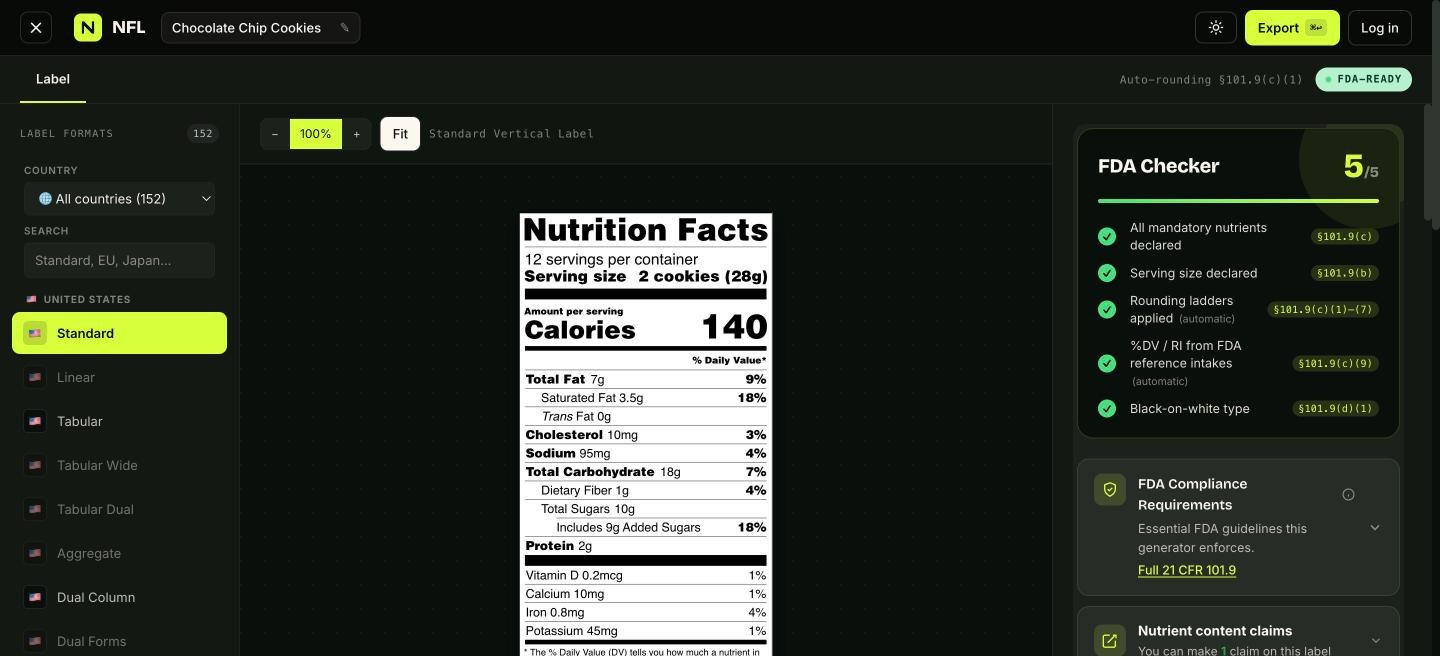
What a compliant food label needs
A food label that can legally ship in the US needs four things working together: a Nutrition Facts panel in an FDA-recognized format (21 CFR 101.9), an ingredient statement in descending weight order (§ 101.4), allergen declarations covering the nine major allergens (FALCPA + the FASTER Act), and a net quantity statement. Most design tools give you none of these - they give you a rectangle that looks like a label.
This food label maker builds all four from one input: your recipe. Ingredients pull live nutrient data from USDA FoodData Central, the panel applies the FDA's rounding rules automatically, the ingredient line orders itself by weight, and allergens you tick render as a bold "Contains:" statement. Change a quantity and everything recalculates.
A label creator, not a template painter
Generic label creators and print shops start from a drawing canvas, which means you are responsible for serving-size math, %DV calculations, and rounding - the exact places FDA warning letters cite. Here the compliance engine is the product: the checker validates mandatory nutrients, serving sizes, type sizes, and rounding as you work, and cites the rule it's applying.
When the label is right, export it as print-ready vector PDF, SVG, EPS, AI, PNG, or JPG and drop it into your packaging artwork. Need the panel inside Illustrator or Canva? Export SVG and place it - the type stays sharp at any size.
| Per 100g | |
|---|---|
| Energy | 2092 kJ / 500 kcal |
| Fat | 25 g |
| of which saturates | 13 g |
| Carbohydrate | 64 g |
| of which sugars | 36 g |
| Protein | 7.1 g |
| Salt | 0.8 g |
| Fat / Lipides | 7 g | 9 % |
| Saturated / Saturés | 3.5 g + Trans 0 g | 18 % |
| Cholesterol / Cholestérol | 10 mg | 3 % |
| Sodium | 95 mg | 4 % |
| Carbohydrate / Glucides | 18 g | 7 % |
| Fibre / Fibres | 1 g | 4 % |
| Sugars / Sucres | 10 g | 10 % |
| Protein / Protéines | 2 g | |
| Vitamin D / Vitamine D | 0 mcg | 0 % |
| Calcium | 10 mg | 1 % |
| Iron / Fer | 1 mg | 4 % |
| Potassium | 45 mg | 1 % |
*5 % ou moins c'est peu, 15 % ou plus c'est beaucoup
Every format, every market
152 label formats across 114 countries: every US FDA variant (standard vertical, tabular, linear, dual column, aggregate, simplified, infant, children, bilingual), plus EU 1169/2011, UK back-of-pack, Canada's bilingual table, Mexico's NOM-051, and a hundred more - each citing its regulation on its reference page.
Selling one product into three markets? Keep one recipe and switch formats - the same data re-renders with each jurisdiction's nutrients, rounding, and layout rules.
From recipe to costed, labeled product
Because the label maker sits on a full recipe engine, you also get cost per batch and per serving, free recipe nutrition analysis, and cloud-saved recipes your team can edit. Supplement brands get a dedicated Supplement Facts generator; home producers can check their state's rules in the guides.
Start free and build a complete label before deciding anything - paid plans (from $12/mo) add exports at scale, more recipes, and inventory with lot tracing. See pricing.