Free nutrition label maker: make an FDA label in minutes
Make a Nutrition Facts label online from your nutrient values or your recipe. The FDA format is free to build and export with no signup, automatic rounding and %DV included. Paid plans add PDF and SVG export and 151 more formats for Canada, the EU, the UK, Mexico, Australia and 100+ other markets.
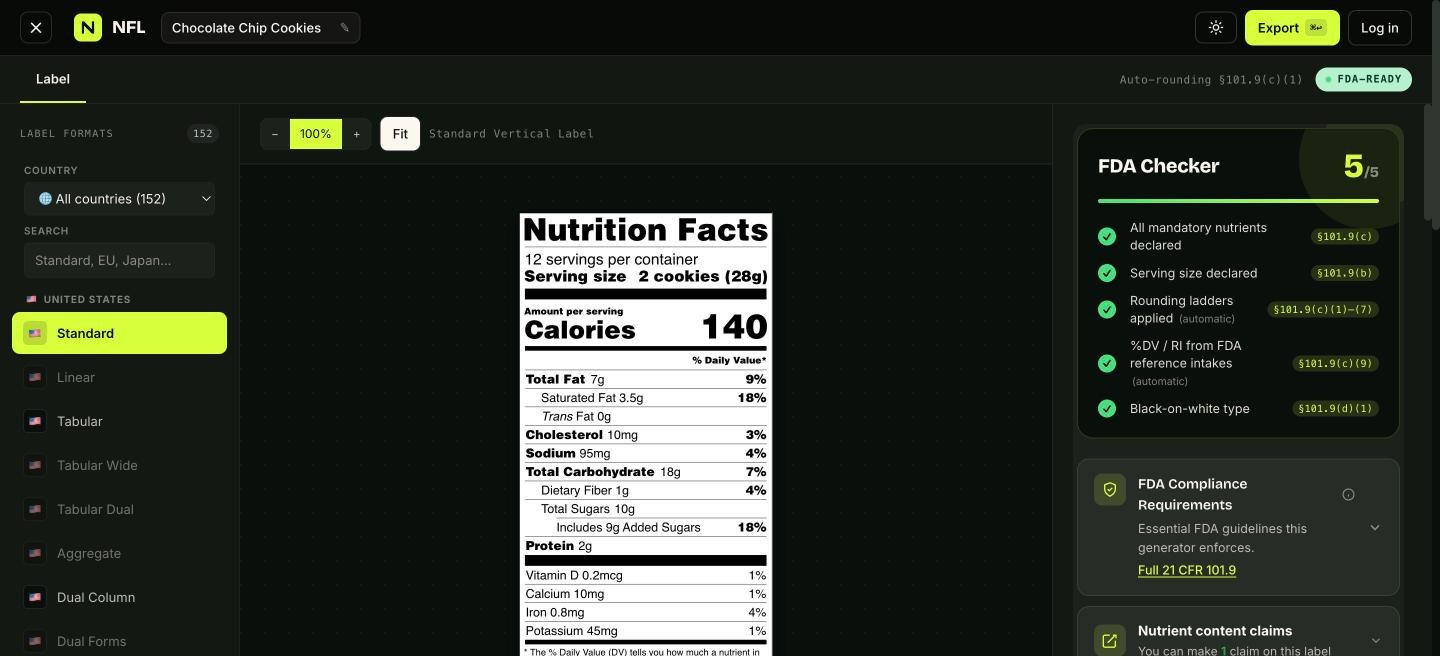
How to make a nutrition label with this tool
Enter your values. Calories, total fat, saturated and trans fat, cholesterol, sodium, total carbohydrate, fiber, total and added sugars, protein, vitamin D, calcium, iron and potassium: the fifteen nutrients the FDA requires. If you have a lab report, type the numbers. If you have a recipe, add the ingredients instead and the maker computes the per-serving values from USDA FoodData Central.
Set the serving. Serving size on a US label is fixed by the reference amount for your food category (21 CFR 101.12), not chosen freely. Pick the category and the maker applies it, in the household measure plus grams the rule requires, and works out servings per container.
Let the rules do the rest. Each nutrient rounds to its own increment, %DV is computed from the unrounded figure, the footnote text matches the format, and the compliance checker lists anything still missing. Then export: JPG free, PNG on Starter, PDF and SVG on Pro, all print-ready.
Why not a template in Word or Canva
A blank template solves the drawing and leaves you the math, and the math is where labels fail inspection. The FDA rounds calories to the nearest 5 below 50 and 10 above; fat to 0.5 g; sodium to 5 mg below 140 and 10 above; and computes %DV from the unrounded value, so two products showing "1 g" of fiber can honestly show different percentages. Type sizes are fixed (nothing under 8 point, calories the largest figure on the panel), the nutrient order is fixed, and the footnote wording is fixed.
This nutrition label maker does all of that automatically, and it still gives you the template if you want one: every FDA format is available as a downloadable template in SVG and PNG, rendered by the same engine.
| Per 100g | |
|---|---|
| Energy | 2092 kJ / 500 kcal |
| Fat | 25 g |
| of which saturates | 13 g |
| Carbohydrate | 64 g |
| of which sugars | 36 g |
| Protein | 7.1 g |
| Salt | 0.8 g |
| Fat / Lipides | 7 g | 9 % |
| Saturated / Saturés | 3.5 g + Trans 0 g | 18 % |
| Cholesterol / Cholestérol | 10 mg | 3 % |
| Sodium | 95 mg | 4 % |
| Carbohydrate / Glucides | 18 g | 7 % |
| Fibre / Fibres | 1 g | 4 % |
| Sugars / Sucres | 10 g | 10 % |
| Protein / Protéines | 2 g | |
| Vitamin D / Vitamine D | 0 mcg | 0 % |
| Calcium | 10 mg | 1 % |
| Iron / Fer | 1 mg | 4 % |
| Potassium | 45 mg | 1 % |
*5 % ou moins c'est peu, 15 % ou plus c'est beaucoup
Every format the rule allows
The US alone has fifteen Nutrition Facts layouts, each permitted under a condition: tabular for packages under 40 square inches, linear under 12, dual column for packages holding two to three servings, simplified for foods with few significant nutrients, formats for infants and children under four, and a bilingual English-Spanish panel. The FDA requirements guide explains which one your package may use.
Beyond the US, the same recipe re-renders to the Canadian bilingual table, the EU 1169/2011 declaration, the UK back-of-pack with traffic lights, Mexico's NOM-051 table with warning seals, the Australian Nutrition Information Panel and 100 more markets. Supplement products use the separate Supplement Facts maker.
From recipe to label, with the rest of the package
Building from a recipe gives you more than the panel. The maker writes the ingredient statement in descending order by weight with sub-ingredients in parentheses, flags the nine major US allergens and drafts the "Contains" line, and calculates cost per serving from what you paid for each ingredient. Sub-recipes (a sauce used in three products) are supported, and saved recipes stay in the cloud so a reformulation updates every label that uses it.
The free labeling tools cover the pieces individually if you prefer: RACC lookup, %DV calculator, allergen detector, ingredient formatter, package-size calculator and FDA label checklist.
What the nutrition label maker costs
The maker is free to use and free to export from, without an account: 3 saved products, the three core US FDA formats and clean JPG on the free plan. Starter adds the Canadian bilingual table and PNG; Pro opens all 152 formats with PDF and SVG; Business adds team seats, the API and EPS. Every price and the refund rule are on the pricing page.